
One API and one prepaid balance for the AI models you need.
Access available AI models through one OpenAI-compatible endpoint. Top up one prepaid balance in Rupiah with QRIS and call any model in the catalog with one API key.
https://router.nibie.app/v1The full docs open after you log in.
Change the base URL, then send a request.
The request below uses OpenAI's Chat Completions format. Send your API key in the Authorization header, pick a model from the catalog, and read the cost in USD from usage.cost in every response.
curl https://router.nibie.app/v1/chat/completions \
  -H "Authorization: Bearer $NIBIEROUTER_API_KEY" \
  -H "Content-Type: application/json" \
  -d '{
    "model": "gpt-5-mini",
    "messages": [{"role": "user", "content": "Halo!"}]
}'{
"id": "chatcmpl-…",
"model": "gpt-5-mini",
"choices": [{
"index": 0,
"message": { "role": "assistant", "content": "Halo! Ada yang bisa dibantu?" },
"finish_reason": "stop"
}],
"usage": {
"prompt_tokens": 9,
"completion_tokens": 12,
"total_tokens": 21,
"cost": 0.0000315
}
}Example response shape from the NibieRouter API docs.
From sign-up to your first request
The same three steps as the Quick Start in the dashboard.
Sign up and top up
Create an account, then add balance with QRIS from any banking or e-wallet app. The current minimum top-up is Rp10.000.
Create an API key
Create a key under API Keys. The dashboard shows the full key only once, so store it in an environment variable.
Set the base URL and send a request
Point your SDK or client at the base URL below, choose a model, and send your first request.
https://router.nibie.app/v1
Four OpenAI-compatible endpoint kinds.
Connect compatible clients and SDKs with one base URL and one API key.
Chat and Reasoning
POST /v1/chat/completionsChat, vision, and thinking models from OpenAI, Anthropic, Google, and DeepSeek with SSE streaming and per-response usage.cost reporting.
Responses API
POST /v1/responsesStateless OpenAI Responses format for structured model outputs and tool invocations.
Embeddings
POST /v1/embeddingsVector embedding models for semantic search, retrieval, and document indexing pipelines.
Model Catalog
GET /v1/modelsPublic JSON catalog listing every active model, its capabilities, and USD pricing per 1M tokens.
Not every OpenAI feature is available. For example, the Responses API is stateless and does not support previous_response_id.
Connect the CLIs, IDEs, and SDKs you already use.
Point your coding tools or application code at the NibieRouter base URL and govern spend with per-key credit limits.
OPENAI_BASE_URL="https://router.nibie.app/v1"- CursorAI code editor
- Enable Override OpenAI Base URL with https://router.nibie.app/v1 in Models settings, then paste your NibieRouter API key.
- Claude CodeCLI coding agent
- Point your OpenAI-compatible gateway config to https://router.nibie.app/v1 and cap spend with a dedicated per-key credit limit.
- OpenAI Codex CLITerminal coding agent
- Export OPENAI_BASE_URL=https://router.nibie.app/v1 and OPENAI_API_KEY with your NibieRouter key in your shell.
- Cline and Roo CodeVS Code agent extensions
- Select the OpenAI Compatible provider, set the Base URL to https://router.nibie.app/v1, and choose any model ID from the catalog.
- ContinueOpen-source IDE assistant
- Set apiBase: https://router.nibie.app/v1 and your NibieRouter apiKey on any model block in config.yaml.
- OpenAI SDKs (Node and Python)Application code
- Pass baseURL or base_url set to https://router.nibie.app/v1 into the official OpenAI client without changing your request calls.
Sample model pricing
Prices in USD per 1M tokens, deducted from your prepaid balance.
| Model | Developer | Input | Output | Capabilities |
|---|---|---|---|---|
| claude-sonnet-5-5 | Anthropic | $2.40 | $12.00 | Vision |
| deepseek-v4-pro | DeepSeek | $1.74 | $5.23 | Thinking |
| gemini/gemini-3.5-flash | $1.80 | $10.80 | Vision, Thinking | |
| gpt-5-mini | OpenAI | $0.30 | $2.40 | Vision |
Prices and model availability may change. Sign in to view the current model catalog and pricing.
GET /v1/modelsTop up with QRIS. Build without the hassle.
- Pay in Rupiah with QRIS from any banking or e-wallet app.
- NibieRouter holds your balance as USD credit, at the rate the Billing page shows before you pay.
- Each request deducts its cost from your balance. NibieRouter rejects requests your balance cannot cover.
- Track costs, tokens, and request logs on the Usage page.
We do not refund or allow withdrawals of added balance.
QRIS
- Payment currency
- Rupiah
- Minimum top-up
- Rp10.000 (current)
- Payment page
- Opens in a new tab
Frequently asked questions
What is NibieRouter?
NibieRouter is an API for reaching the available AI models through one OpenAI-compatible endpoint. You use one API key and one prepaid balance for every model in the catalog.
Is NibieRouter OpenAI-compatible?
Yes, for Chat Completions, Responses, Embeddings, and Models. Set the base URL to https://router.nibie.app/v1 and use your NibieRouter API key. Some features differ: for example, the Responses API does not support previous_response_id.
How does prepaid billing work?
You top up in Rupiah with QRIS, and NibieRouter holds your balance as USD credit. Each request deducts its cost, which the response reports in usage.cost. NibieRouter rejects requests your balance cannot cover with status 402.
Which AI models are available?
The catalog has chat and embedding models from several developers, including OpenAI, Anthropic, Google, and DeepSeek. The current list is at GET /v1/models, or on the Models page after you log in.
Can I use NibieRouter with AI agents?
Yes, as long as your agent or framework lets you set an OpenAI-compatible base URL and API key. Each key can have its own credit limit and list of allowed models, so you can cap what every agent spends.
How do I top up my balance?
Open Billing, choose Top up, and enter an amount in Rupiah. The QRIS payment page opens in a new tab. Once the payment succeeds, the dashboard updates the status and your balance automatically. Sumopod processes QRIS payments.
Can I refund or withdraw unused balance?
No. We do not refund or allow withdrawals of added balance.
Where can I monitor my API usage?
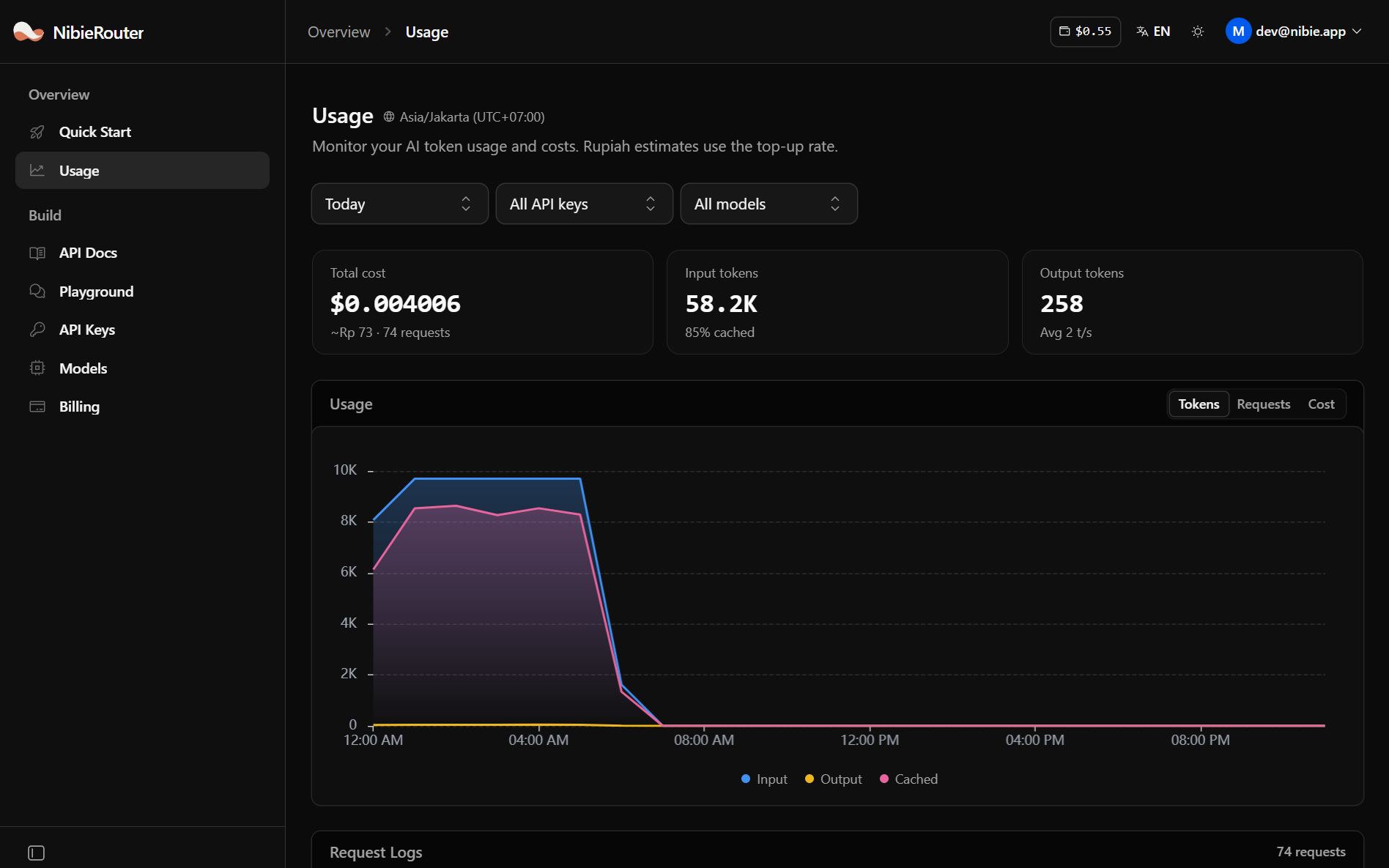
On the Usage page in the dashboard. It shows total cost, token counts, and a log of every request, including failed ones. Rupiah estimates use the top-up rate.
Ready to build with AI?
Start integrating available AI models through one API and one prepaid balance.